Download UE Explorer
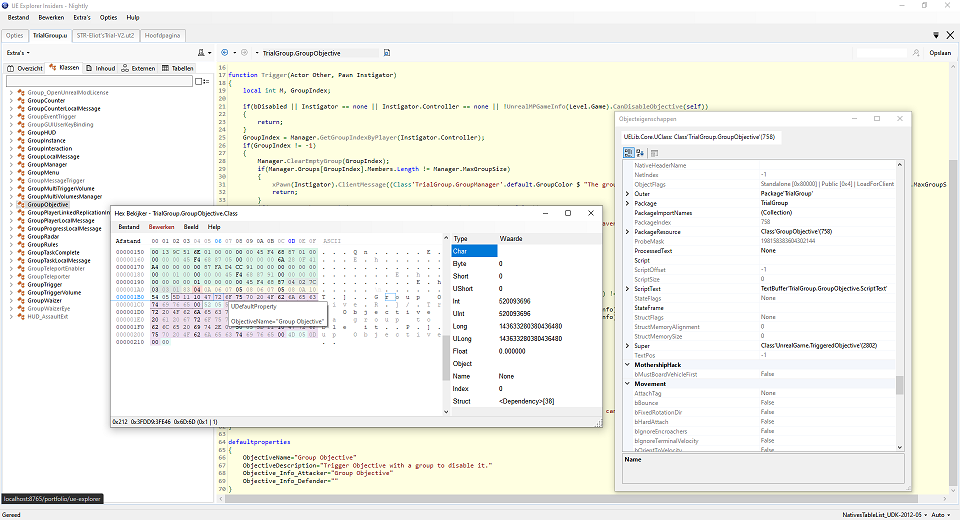
Decompiler and package explorer for Unreal Engine (.upk, .u) files, designed to inspect UnrealScript and package contents.
System Requirements
- Operating System: Windows 7 SP1†, 8.1†, Windows 10; May 2019 Update (version 1903)†, or Windows 11
- Memory: At least 512MB of RAM
- .NET Framework 4.8
Other releases such as Insiders and Nightly may have different and higher requirements.
FAQS
Can I use this for UE4/UE5?
UE Explorer is primarily designed for Unreal Engine 1–3 content (UnrealScript-based games).
There is however, limited support for (UE4) .uasset packages.
Can I save or edit packages?
UE Explorer is a decompiler and viewer, not a full editor.
You can:
- View decompiled scripts and content
- Export certain content for analysis
- Use the Hex Viewer to selectively edit bytes of any object
You cannot:
- Recompile edited scripts back into working game packages
- Safely modify and repack content for use in-game
Can UE Explorer open every Unreal game?
No. Compatibility depends on the game’s engine version and how its packages were cooked. Some titles may require the platform to be set to 'Console' (bottom right), or are otherwise not supported at all.
Is this legal to use?
Yes, UE Explorer is legal to use as a reverse engineering and educational tool. However, what you do with the output depends on the content you are inspecting. Always respect copyright and licensing restrictions.
Can I use UE Explorer for modding?
Yes, within the limits of the target game and its community guidelines. Many modders rely on UE Explorer to study package formats, APIs, and scripting behavior while developing mods.
Additionally, they may also use the Hex Viewer to find or edit parts of a package.
Why does some code look incorrect or incomplete?
Decompiled code is an interpretation of compiled bytecode. As a result, it may:
- Lose variable names (Borderlands, ACM, Batman)
- Lose formatting (writing style is not preserved after compilation)
- Lose meta data (comments, editor info) in cooked packages (meta data is often stripped during the cooking-phase)
- Contain missing type information (Constants, Enums)
- Show simplified (while;for loops) or inferred logic
- Differ slightly from the original source
Why do some packages fail to load?
This can happen due to:
- Package version wildly differs from standard Unreal Engine
- Package compression or encryption
- Wrong configured platform, try 'Console' (Bottom right) if you believe the package has been cooked for Xbox 360 (Xenon)
- Not properly recognized, the package may be compatible, but the auto detection is not aware as to what game compatibility to use.
Many Unreal Engine games contain heavily customized engine builds. Some modifications can partially or completely break compatibility with UE Explorer
What does “/* Array type not detected */” mean?
This appears when UE Explorer cannot fully infer the property type of a dynamic array during decompilation.
It does not indicate corruption or a broken file, only that the original property type could not be retrieved.
It is however possible to define array types yourself
Why are some functions empty and what does “native” mean in UnrealScript?
A native function is implemented as an intrinsic part of the engine's code rather than in UnrealScript itself. UE Explorer can usually identify native declarations, but not recover their internal implementation, for that checkout tools like Ghidra or IDA.
Why do some strings appear as gibberish?
This can happen due to encoding differences, unsupported localization formats, or partially invalid package data.
Is UE Explorer still actively maintained?
Maintenance updates and compatibility improvements are still being made.
Additionally, work is being done on UE Explorer 2.0 (cleaned up code base, new UI using docks, but still classic WinForms)
There is also an Insiders build (not 2.0) available to project contributors. It includes the latest updates to UE Explorer, as well as experimental features currently in development.
Will support for models and animations be added?
Possibly in the future, though the primary focus of UE Explorer remains UnrealScript decompilation and package inspection.